
D3100 DSLR1.1 - App Store
You'll be able to see results in few seconds.
Publisher Description
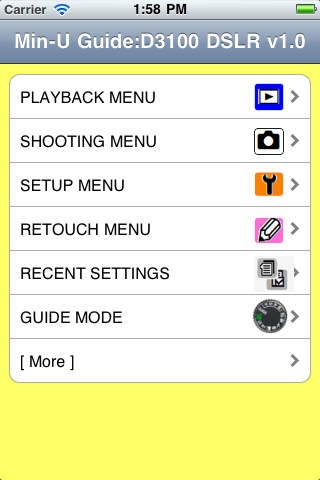
'D3100 DSLR v1.0' provides quick and easy camera menu references for the Nikon D3100, with explanations and diagrams covering over one hundred menus for camera controls and options.
Min-U Guides are the original Nikon DSLR iPhone/touch app guides. No promotions...no cross-selling...no fluff.
You are freed from endlessly finding or bookmarking details on D3100 menu usage that are perhaps online but never before created specifically for iPhone/iPod touch and iPad.
Navigate quickly and directly to the menu in question and find out when/where/why you should or shouldn't use various options. 'D3100 DSLR' is bigger than ever and OS 4.3 ready, featuring a handy list of 'D3100 Quick Specs', a troubleshooting checklist, error messages, supported standards, digital photography & DSLR lens glossaries, D3100 tips, iPad Camera Kit overview and new Nikon product previews.
Now you can spend your time shooting more amazing digital photos instead of carrying and digging through lengthy reference materials. 'D3100 DSLR' v1.0 is organized in the same manner as the D3100 camera control menus, meaning that while you use it you also learn more about using your D3100.
New camera products will have their own Min-U Guides and will join a growing library for Nikon (D3, D3x, D3s, D300, D300s, D3000, D700, D5000, D60, D40, D40x, D200, D80 etc.) existing cameras, flash units and lenses. Feel free to contact us if there is a specific photography related guide you would like to see developed. Thanks again to everyone for the continued support and please keep the feedback coming.
Check Min-UGuide.com (not associated with Nikon Corp.) and the App Store often to see which new product guides have been recently added.
If you own more than one Nikon DSLR, please be sure to check out our biggest app, 'DSLR Mega HD' for iPad, that contains eleven camera guides (D3, D90, D200, D300, D300s, D700, D3000, D3100, D5000, D5100 and D7000) bundled into one and 'DSLR Toolkit'.
D3100 DSLR v1.0 is current with Nikon D3100 v1.01 Firmware.
Min-U Guide Nikon DSLR topics include:
Active D-Lighting ADL Bracketing
AF Area Modes AE Lock
AF Assist Available Shutter Speeds with Flash
AF Focus Area Selection Control Panel reference
AF Focus Modes Custom Settings
Auto Low-Pass Dust Reference Photo
Filter (Sensor) Cleaning Exposure Bracketing
Battery Information Exposure Compensation
Color Spaces Exposure Modes
File Numbering Options Flash Exposure Compensation
Focus Lock Flash Modes
High-ISO Noise Reduction Flash Output (FV) Lock
Image Quality Flash Sync Modes
Image Size Image Overlays
LCD Brightness Image Playback
Long Exposure Noise Reduction ISO Equivalency
Manual Focus Live View
Memory Card Formatting Manual Low-Pass Filter (Sensor) Cleaning
Menu Reset Max Flash Shooting Distances
Metering Modes Multiple Exposures
Movies Playback Options
Picture Control Scene Modes GPS Eye-fi
Reset to defaults Viewfinder Reference
Self-Timer White Balance Bracketing
Guide Modes White Balance Options
Requires iOS 3.2 or later. Compatible with iPhone, iPad, and iPod touch.
About D3100 DSLR
The company that develops D3100 DSLR is K Tidwell. The latest version released by its developer is 1.1.
To install D3100 DSLR on your iOS device, just click the green Continue To App button above to start the installation process. The app is listed on our website since 2011-07-20 and was downloaded 0 times. We have already checked if the download link is safe, however for your own protection we recommend that you scan the downloaded app with your antivirus. Your antivirus may detect the D3100 DSLR as malware if the download link is broken.
How to install D3100 DSLR on your iOS device:
- Click on the Continue To App button on our website. This will redirect you to the App Store.
- Once the D3100 DSLR is shown in the iTunes listing of your iOS device, you can start its download and installation. Tap on the GET button to the right of the app to start downloading it.
- If you are not logged-in the iOS appstore app, you'll be prompted for your your Apple ID and/or password.
- After D3100 DSLR is downloaded, you'll see an INSTALL button to the right. Tap on it to start the actual installation of the iOS app.
- Once installation is finished you can tap on the OPEN button to start it. Its icon will also be added to your device home screen.
Program Details
System requirements
Download information
Pricing
Version History
version 1.1
posted on 2011-07-20
Disclaimer
Official App Store Link
We do not host D3100 DSLR on our servers. We did not scan it for viruses, adware, spyware or other type of malware. This app is hosted by Apple and passed their terms and conditions to be listed there. We recommend caution when installing it.
The App Store link for D3100 DSLR is provided to you by apps112.com without any warranties, representations or guarantees of any kind, so access it at your own risk.
If you have questions regarding this particular app contact the publisher directly. For questions about the functionalities of apps112.com contact us.
